

Datos:
- Sistema Operativo de los servidores: Debian Stretch / Buster
- ADDC: addc.nodo.local, ntp1.nodo.local (192.168.9.15)
- PROXY1: proxy1.nodo.local (192.168.9.69). No está unida al dominio y tiene un disco
cache “/dev/sdb1” de 5 GB. - Versión de Squid: 3.5.x / 4.x
- Versión de Samba: 4.10.x
1. ADDC Samba4:
Las configuraciones que se describen a continuación, se deben hacer en el servidor
que contiene al controlador de dominio, en este caso basado en Samba4. En caso de
usar Active Directory de Windows, simplemente usar las RSAT de Windows para crear
los OU, grupos y usuarios.
#========================================
NOTA:
Desde una PC unida al dominio con un usuario con permisos de administración en el
controlador de dominio basado en Samba4, puede hacer uso también de las RSAT y no
ejecutar los comandos que se describen a continuación.
#========================================
Records del servidor proxy:
samba-tool dns add localhost nodo.local proxy1 A 192.168.9.69 -U "administrator"%"Admin*123"
samba-tool dns add localhost nodo.local proxy CNAME proxy1.nodo.local -U "administrator"%"Admin*123"
samba-tool dns add localhost nodo.local squidproxy CNAME proxy1.nodo.local -U "administrator"%"Admin*123"
samba-tool dns add localhost 168.192.in-addr.arpa 69.9 PTR proxy1.nodo.local. -U "administrator"%"Admin*123"
samba-tool dns add localhost 168.192.in-addr.arpa 69.9 PTR proxy.nodo.local. -U "administrator"%"Admin*123"
samba-tool dns add localhost 168.192.in-addr.arpa 69.9 PTR squidproxy.nodo.local. -U "administrator"%"Admin*123"
Crear nueva Unidad Organizativa para “Usuarios”:
samba-tool ou create "OU=Usuarios,DC=nodo,DC=local" --description="<Unidad Organizativa para Usuarios>"
Crear nueva Unidad Organizativa para “Redes”:
samba-tool ou create "OU=Redes,DC=nodo,DC=local" --description="<Unidad Organizativa para Administradores de Redes>"Crear nueva Unidad Organizativa para “Proxy”:
samba-tool ou create "OU=Servicios,DC=nodo,DC=local" --description="<Unidad Organizativa para Servicios>"
samba-tool ou create "OU=Proxy,OU=Servicios,DC=nodo,DC=local" --description="<Unidad Organizativa para Proxy>"
Crear grupos de navegación para "Proxy":
samba-tool group add Intranet --groupou="OU=Proxy,OU=Servicios" --description="<Grupo de Acceso a Intranet>"
samba-tool group add Internet --groupou="OU=Proxy,OU=Servicios" --description="<Grupo de Acceso a Internet>"
Crear usuarios de navegación para "Proxy":
samba-tool user create nombre1.apellido Prueba2019* --userou="OU=Usuarios" \
--given-name="Nombre1" --surname="Apellidos" --department="Recursos Humanos" \
--company="Mi Empresa" [email protected]
samba-tool user create nombre2.apellido Prueba2019* --userou="OU=Redes" \
--given-name="Nombre" --surname="Apellido" --department="Informatica" \
--company="Mi Empresa" [email protected]
Agregar usuarios a los grupos creados:
samba-tool group addmembers "Intranet" nombre1.apellido
samba-tool group addmembers "Internet" nombre2.apellido
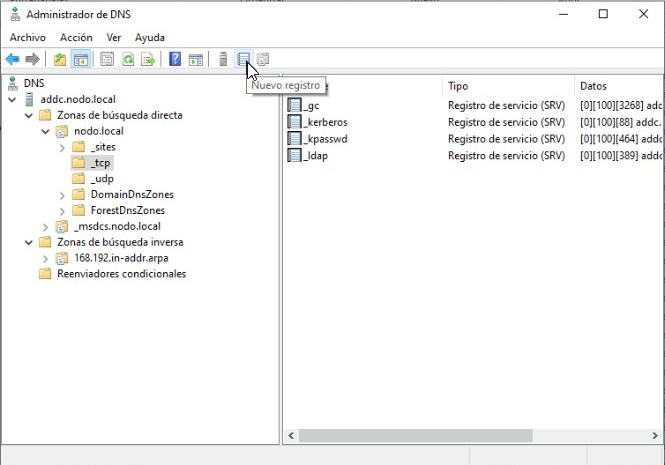
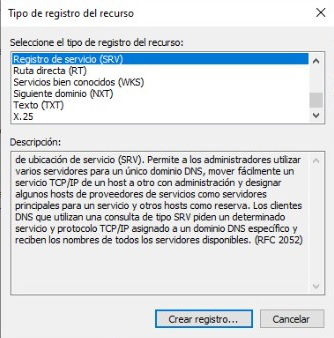
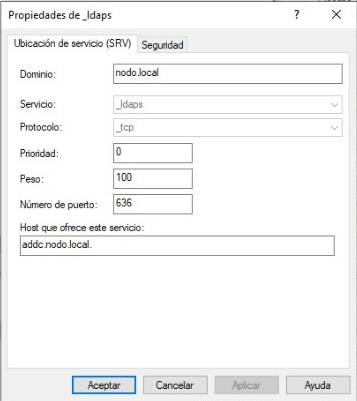
Agregamos el SRV para ldaps desde las RSAT de Windows, usando la herramienta de
administración “DNS”, desde una de las PC unida al dominio, con un usuario con poder de
administración:
Proxy Squid:
Las configuraciones que se describen a continuación, se deben hacer en el servidor que contiene al proxy Squid.
Disco cache identificado en este caso con la etiqueta “/dev/sdb1”:
mkfs.ext4 /dev/sdb1
mkdir /var/cache/squid
nano /etc/fstab
Agregar lo siguiente:
# >>> [squid cache]
/dev/sdb1   /var/cache/squid    ext4       defaults        0         0
# <<< [squid cache]
Aplicamos los cambios:
mount -aEditamos el fichero “/etc/resolv.conf”:
nano /etc/resolv.confBorramos todo y agregamos el dominio y el servidor DNS que se encuentra en el ADDC (adapte a su red):
search nodo.local
domain nodo.local
nameserver 192.168.9.15
Fichero hosts, para dar mayor disponibilidad en caso de fallo del DNS:
nano /etc/hostsLo dejamos como sigue, adaptando a su red, para brindar mayor disponibilidad ante una falla del servicio DNS:
127.0.0.1       localhost
192.168.9.69    proxy1.nodo.local       	proxy1
2.1. Sincronización de tiempo
Configuramos la zona horaria (America/Havana):
dpkg-reconfigure tzdata
Instalamos la herramienta para sincronizarse con el servidor de tiempo:
apt-get install ntpdate
Editamos el fichero de configuración:
nano /etc/systemd/timesyncd.conf

Agregamos lo siguiente:

[Time]
NTP=ntp1.nodo.local
Sincronizamos el tiempo con el servidor:
ntpdate ntp1.nodo.local
timedatectl set-ntp true
Verificamos el estado del tiempo después de la sincronización:
timedatectl status

Debe devolvernos lo siguiente:

Local time: mié 2019-10-16 00:44:28 CDT
                 Universal time: mié 2019-10-16 04:44:28 UTC
                       RTC time: mié 2019-10-16 04:44:28
                      Time zone: America/Havana (CDT, -0400)
      System clock synchronized: yes
	systemd-timesyncd.service active: yes
                RTC in local TZ: no
2.2. Integrando Squid al AD mediante Kerberos
Instalamos Squid, paquetes necesarios para Kerberos y herramientas para LDAP:
apt-get install squid krb5-user msktutil libsasl2-modules-gssapi-mit ldap-utilsEditamos o creamos si no existe “/etc/default/squid”.
nano /etc/default/squid

Agregamos lo siguiente:

KRB5RCACHETYPE=none
export KRB5RCACHETYPE
KRB5_KTNAME=/etc/squid/proxy.keytab
export KRB5_KTNAME
Configuración de Kerberos:
mv /etc/krb5.conf /etc/krb5.conf.salva
nano /etc/krb5.conf

Agregamos los siguiente:

[libdefaults]
        default_realm = NODO.LOCAL
        dns_lookup_realm = false
        dns_lookup_kdc = true
        clockskew = 3600
        ticket_lifetime = 24h
        default_keytab_name = /etc/squid/proxy.keytab
# The following krb5.conf variables are only for MIT Kerberos.
        kdc_timesync = 1
        ccache_type = 4
        forwardable = true
        proxiable = true

[realms]
        NODO.LOCAL = {
                kdc = ADDC.NODO.LOCAL
                master_kdc = ADDC.NODO.LOCAL
                admin_server = ADDC.NODO.LOCAL
                default_domain = nodo.local
                }
[domain_realm]
        .nodo.local = NODO.LOCAL
        nodo.local = NODO.LOCAL
A continuación, se describe cómo generar archivo “proxy.keytab” y registrar el SPN en el dominio:
kinit [email protected]

Nos sale para poner el password:

Password for [email protected]: (Admin*123*)
Generamos el ticket y registramos el SPN para el squid en el dominio:
msktutil -c -b "CN=Computers" -s HTTP/proxy1.nodo.local \
-h proxy1.nodo.local -k /etc/squid/proxy.keytab --computer-name SQUIDPROXY \
--upn HTTP/proxy1.nodo.local --server addc.nodo.local --verbose \
Comprobamos que todo haya resultado bien:
kinit -k HTTP/proxy1.nodo.local

El comando anterior no debe devolver nada, si todo está bien.

klist -k

Nos debe devolver lo siguiente:

Keytab name: FILE:/etc/squid/proxy.keytab
KVNO Principal
---- -----------------------------------------------------------------
   1 [email protected]
   1 [email protected]
   1 [email protected]
   1 HTTP/[email protected]
   1 HTTP/[email protected]
   1 HTTP/[email protected]
   1 host/[email protected]
   1 host/[email protected]
   1 host/[email protected]
   1 host/[email protected]
   1 host/[email protected]
   1 host/[email protected]
Verificamos el ticket:
klist

Debe devolver lo siguiente:

Ticket cache: FILE:/tmp/krb5cc_0
Default principal: HTTP/[email protected]

Valid starting     Expires            Service principal
10/10/19 21:29:17  11/10/19 07:29:17  krbtgt/[email protected]
        renew until 11/10/19 21:29:17
Establecemos los permisos del archivo keytab para que solo pueda ser leido por squid:
chown proxy:proxy /etc/squid/proxy.keytab
chmod 640 /etc/squid/proxy.keytab
Comprobamos que la cuenta de host se actualiza correctamente:
msktutil --auto-update --verbose --computer-name SQUIDPROXY -k /etc/squid/proxy.keytabNos debe devolver lo siguiente:
-- init_password: Wiping the computer password structure
 -- generate_new_password: Generating a new, random password for the computer account
 -- generate_new_password:  Characters read from /dev/urandom = 77
 -- get_dc_host: Attempting to find Domain Controller to use via DNS SRV record in domain NODO.LOCAL for procotol tcp
 -- get_dc_host: Found DC: addc.nodo.local
 -- get_dc_host: Canonicalizing DC through forward/reverse lookup...
 -- get_dc_host: Found Domain Controller: addc.nodo.local
 -- create_fake_krb5_conf: Created a fake krb5.conf file: /tmp/.msktkrb5.conf-Ndmivk
 -- reload: Reloading Kerberos Context
 -- finalize_exec: SAM Account Name is: SQUIDPROXY$
 -- try_machine_keytab_princ: Trying to authenticate for SQUIDPROXY$ from local keytab...
 -- switch_default_ccache: Using the local credential cache: FILE:/tmp/.mskt_krb5_ccache-9XK9sE
 -- finalize_exec: Authenticated using method 1
 -- LDAPConnection: Connecting to LDAP server: addc.nodo.local
SASL/GSSAPI authentication started
SASL username: [email protected]
SASL SSF: 56
SASL data security layer installed.
 -- ldap_get_base_dn: Determining default LDAP base: dc=NODO,dc=LOCAL
 -- get_default_ou: Determining default OU: CN=Computers,DC=nodo,DC=local
 -- ldap_get_pwdLastSet: pwdLastSet is 132152306718258090
 -- execute: Password last set 0 days ago.
 -- execute: Exiting because password was changed recently.
 -- ~KRB5Context: Destroying Kerberos Context
Terminamos el “kinit” con el usuario “administrator”:
kdestroy
Verificamos que se haya cerrado la conexión:0
klist
Debe devolver lo siguiente:
klist: No credentials cache found (filename: /tmp/krb5cc_0)
2.3. Configuración básica de Squid con autenticación por Kerberos
Editamos el fichero de configuración, no sin antes hacer una copia de respaldo:
mv /etc/squid/squid.conf /etc/squid/squid.conf.salva
nano /etc/squid/squid.conf
Agregamos la siguiente configuración básica para un único proxy. Recuerde adaptar la configuración a su red:
#############
## PROXY1 ####
###############

##############################
# ESCUCHA Y SALIDA DEL PROXY #
##############################

#---------------------------------------------------------------------
http_port 192.168.9.69:3128
tcp_outgoing_address 192.168.9.69
icp_port 3130
#---------------------------------------------------------------------

###############################
# MEMORIA CACHE Y DISCO CACHE #
###############################

#---------------------------------------------------------------------
cache_mem 512 MB           #especifica la cantidad de memoria ram que el proxy usa para los objetos
cache_replacement_policy lru #especifica el metodo LRU para la politica de reemplazo en el disco cache
#cache_dir <schema> <ruta> <espacio MB> <memoria L1> <memoria L2> # especifica donde y como almacena archivos cache en disco (se recomienda usar maximo un 85% del espacio disponible por el disco) (usar L1=16 y L2=256)
cache_dir ufs /var/cache/squid 4352 16 256
cache_access_log /var/log/squid/access.log
cache_log /var/log/squid/cache.log
cache_store_log /var/log/squid/store.log
pid_filename /var/run/squid.pid
cache_swap_low 90 #especifica el espacio maximo en % y controla el reemplazo de los objetos almacenados en el disco
cache_swap_high 95
maximum_object_size_in_memory 4 KB #especifica la cantidad de memoria ram maxima ocupada por un objeto
maximum_object_size 50 MB
#---------------------------------------------------------------------

##############
# PRIVACIDAD #
##############

#---------------------------------------------------------------------
# Privacidad y anonimato del proxy
via off
forwarded_for off
request_header_access From deny all
request_header_access Server deny all
request_header_access WWW-Authenticate deny all
request_header_access Link deny all
request_header_access cache-Control deny all
request_header_access X-Cache-Lookup deny all
request_header_access Via deny all
request_header_access X-Forwarded-For deny all
request_header_access Pragma deny all
request_header_access Keep-Alive deny all
httpd_suppress_version_string on
#---------------------------------------------------------------------

#################
# AUTENTICACION #
#################

#---------------------------------------------------------------------
auth_param negotiate program /usr/lib/squid/negotiate_kerberos_auth -r -d -s HTTP/[email protected]
auth_param negotiate children 20 startup=0 idle=1
auth_param negotiate keep_alive off
#---------------------------------------------------------------------

#################################
# CONTROL INDIRECTO DE LA CACHE #
#################################

#---------------------------------------------------------------------
#refresh_pattern [-i] regexp    min percent     max  [options]
refresh_pattern       ^ftp:    1440     20%   10080
refresh_pattern       ^gopher: 1440      0%    1440
refresh_pattern       .           0     20%    4320
#---------------------------------------------------------------------

##########################
# DEFINICION DE LAS ACLs #
##########################

#acl <nombre de la lista> <tipo> <lo que compone a la lista>

# ACL de autenticacion
#---------------------------------------------------------------------
#acl AUTH proxy_auth REQUIRED
#---------------------------------------------------------------------

# Mapeo de grupos con Kerberos
#---------------------------------------------------------------------
# external_acl_type <nombre_generico_acl_externa> ipv4 children-startup=n children-max=N ttl=300 negative_ttl=60 %LOGIN ruta/al/helper/ext_kerberos_ldap_group_acl -a -D EXAMPLE.COM

external_acl_type kerberos_ldap_grupo ipv4 children-startup=10 children-max=15 ttl=300 negative_ttl=60 %LOGIN /usr/lib/squid/ext_kerberos_ldap_group_acl -a -D NODO.LOCAL

# acl <nombre_acl> external <nombre_generico_acl_externa> <nombre_grupo_kerberos>
acl intranet external kerberos_ldap_grupo Intranet
acl internet external kerberos_ldap_grupo Internet
#---------------------------------------------------------------------

# ACLs de puertos y metodos de conexion
#---------------------------------------------------------------------
acl SSL_ports port 9091                 # openfire web admin
acl SSL_ports port 8443                 # Portal Nauta
acl SSL_ports port 7071                 # zimbra web admin
acl SSL_ports port 443                  # https
acl SSL_ports port 563

acl Safe_ports port 8443                # Portal Nauta
acl Safe_ports port 777                 # multiling http
acl Safe_ports port 591                 # filemaker
acl Safe_ports port 563
acl Safe_ports port 488                 # gss-http
acl Safe_ports port 443                 # https, snews
acl Safe_ports port 280                 # http-mgmt
acl Safe_ports port 210                 # wais
#acl Safe_ports port 1025-65535         # unregistered ports
acl Safe_ports port 80                  # http
acl Safe_ports port 70                  # gopher
acl Safe_ports port 21                  # ftp

acl CONNECT method CONNECT
acl POST method POST
#---------------------------------------------------------------------

# ACLs de acceso
#---------------------------------------------------------------------
acl manager proto cache_object
acl workstations src 192.168.3.0/24
acl limitecx maxconn 50
acl Cuba dstdomain .cu
#---------------------------------------------------------------------

##########
# REGLAS #
##########

#access_list <deny | allow> <lista de control de acceso>

# Permisos que garantizan el acceso minimo al proxy
#---------------------------------------------------------------------
http_access allow manager localhost
http_access deny manager

# Permitiendo HTTPS solo por puertos SSL y HTTP por puertos seguros
http_access deny CONNECT !SSL_ports
http_access deny POST !SSL_ports
http_access deny !Safe_ports

# Permitiendo localhost y usuarios autenticados por Kerberos
http_access allow localhost

# Permitiendo grupos del ADDC que sean estaciones de trabajo
http_access allow internet workstations
http_access allow intranet workstations Cuba

# Denegando todo lo demas
http_access deny all

# Otros accesos
http_reply_access allow all
always_direct deny all
icp_access allow all
#---------------------------------------------------------------------

##################
# OTRAS OPCIONES #
##################

#---------------------------------------------------------------------
cache_mgr [email protected]
cache_effective_user proxy
visible_hostname anonymous
#coredump_dir /var/spool/squid
coredump_dir /var/cache/squid
positive_dns_ttl 1 hour
authenticate_ip_ttl 5 minute
error_directory /usr/share/squid/errors/Spanish
client_db on                            # Directiva necesaria para el uso de "maxconn"
#---------------------------------------------------------------------

#####################
# OPCIONES DE DEBUG #
#####################

#---------------------------------------------------------------------
# Todo
#debug_options ALL,9

# ACLs y Autenticacion
debug_options 28,9 29,9
#---------------------------------------------------------------------
#===============================
NOTA:
En la configuración anterior se usó la autenticación de grupos con Kerberos por su “helper” correspondiente “ext_kerberos_ldap_group_acl”. Esto posibilita que la calidad del servicio en el proxy responda a los usuarios que pertenezcan a dichos grupos del directorio activo.
Esta variante aprovecha la ventaja de la seguridad, pues usando el “helper” “ext_kerberos_ldap_group_acl” se realizan consultas al LDAP directamente, usando un “bind dn” o usuario para autenticarse, mientras Kerberos usa su propia autenticación y ticket, se cuentan en el servidor para la autenticación del LDAP, que ya se encuentra integrado en Samba4.
También es necesario aclarar que, si se tiene IPv6 deshabilitado, se recomienda mantener la opción ipv4 en la definición de la ACL externa genérica, de lo contrario el programa no hará su función correctamente, aun cuando Squid inicie sin errores.
#===============================
Detenemos Squid:
service squid stopCreamos los directorios para la cache de Squid:
mkdir -p /var/cache/squid
chmod 755 /var/cache/squid
chown proxy:proxy /var/cache/squid
squid -z
Nos debe devolver lo siguiente:
root@proxy1:~# 2019/10/10 23:04:43 kid1| Set Current Directory to /var/spool/squid
2019/10/10 23:04:43 kid1| Creating missing swap directories
2019/10/10 23:04:43 kid1| /var/cache/squid exists
2019/10/10 23:04:43 kid1| Making directories in /var/cache/squid/00
2019/10/10 23:04:43 kid1| Making directories in /var/cache/squid/01
2019/10/10 23:04:43 kid1| Making directories in /var/cache/squid/02
2019/10/10 23:04:43 kid1| Making directories in /var/cache/squid/03
2019/10/10 23:04:43 kid1| Making directories in /var/cache/squid/04
2019/10/10 23:04:43 kid1| Making directories in /var/cache/squid/05
2019/10/10 23:04:43 kid1| Making directories in /var/cache/squid/06
2019/10/10 23:04:43 kid1| Making directories in /var/cache/squid/07
2019/10/10 23:04:43 kid1| Making directories in /var/cache/squid/08
2019/10/10 23:04:43 kid1| Making directories in /var/cache/squid/09
2019/10/10 23:04:43 kid1| Making directories in /var/cache/squid/0A
2019/10/10 23:04:43 kid1| Making directories in /var/cache/squid/0B
2019/10/10 23:04:43 kid1| Making directories in /var/cache/squid/0C
2019/10/10 23:04:43 kid1| Making directories in /var/cache/squid/0D
2019/10/10 23:04:43 kid1| Making directories in /var/cache/squid/0E
2019/10/10 23:04:44 kid1| Making directories in /var/cache/squid/0F
Iniciamos Squid:
service squid startComprobamos que no haya errores de sintaxis en la configuración de Squid:
squid -k checkSi el comando anterior no devuelve nada, es porque la configuración no tiene errores.
Nos autenticamos por Kerberos, con un usuario del grupo de internet, para las pruebas:
kinit [email protected]

Ponemos la contraseña:

Password for [email protected]: (Prueba2019*)
Comprobamos que en la base de datos de LDAP exista la computadora que representa al proxy:
ldapsearch -Tx -Y GSSAPI -b "dc=nodo,dc=local" cn=SQUIDPROXY -h addc.nodo.localNos debe devolver algo como esto:
SASL/GSSAPI authentication started
SASL username: [email protected]
SASL SSF: 56
SASL data security layer installed.
# extended LDIF
#
# LDAPv3
# base <dc=nodo,dc=local> with scope subtree
# filter: cn=SQUIDPROXY
# requesting: ALL
#

# SQUIDPROXY, Computers, nodo.local
dn: CN=SQUIDPROXY,CN=Computers,DC=nodo,DC=local
objectClass: top
objectClass: person
objectClass: organizationalPerson
objectClass: user
objectClass: computer
cn: SQUIDPROXY
instanceType: 4
whenCreated: 20191011012431.0Z
uSNCreated: 5419
name: SQUIDPROXY
objectGUID:: 07ultBE+YEmGxSHFz7Vhjg==
userAccountControl: 4096
badPwdCount: 0
codePage: 0
countryCode: 0
badPasswordTime: 0
lastLogoff: 0
pwdLastSet: 132152306718258090
primaryGroupID: 515
objectSid:: AQUAAAAAAAUVAAAA9vkY0nLbDMzfz+vWdQQAAA==
accountExpires: 9223372036854775807
sAMAccountName: SQUIDPROXY$
sAMAccountType: 805306369
objectCategory: CN=Computer,CN=Schema,CN=Configuration,DC=nodo,DC=local
isCriticalSystemObject: FALSE
dNSHostName: proxy1.nodo.local
userPrincipalName: HTTP/[email protected]
msDS-SupportedEncryptionTypes: 28
servicePrincipalName: HTTP/proxy1.nodo.local
servicePrincipalName: host/proxy1.nodo.local
lastLogonTimestamp: 132152309348330780
whenChanged: 20191011012854.0Z
uSNChanged: 5427
lastLogon: 132152479685631220
logonCount: 26
distinguishedName: CN=SQUIDPROXY,CN=Computers,DC=nodo,DC=local

# search reference
ref: ldap://nodo.local/CN=Configuration,DC=nodo,DC=local

# search reference
ref: ldap://nodo.local/DC=DomainDnsZones,DC=nodo,DC=local

# search reference
ref: ldap://nodo.local/DC=ForestDnsZones,DC=nodo,DC=local

# search result
search: 4
result: 0 Success

# numResponses: 5
# numEntries: 1
# numReferences: 3
Comprobamos la autenticación por Kerberos:
/usr/lib/squid/negotiate_kerberos_auth_test proxy1.nodo.local | awk \
'{sub(/Token:/,"YR"); print $0}END{print"QQ"}'| \
/usr/lib/squid/negotiate_kerberos_auth -d -r -s HTTP/[email protected]
Debe devolver algo como esto:
negotiate_kerberos_auth.cc(487): pid=2122 :2019/10/11 12:42:29|
negotiate_kerberos_auth: INFO: Starting version 3.0.4sq
negotiate_kerberos_auth.cc(546): pid=2122 :2019/10/11 12:42:29|
negotiate_kerberos_auth: INFO: Setting keytab to /etc/squid/proxy.keytab
negotiate_kerberos_auth.cc(570): pid=2122 :2019/10/11 12:42:29|
negotiate_kerberos_auth: INFO: Changed keytab to MEMORY:negotiate_kerberos_auth_2122
negotiate_kerberos_auth.cc(610): pid=2122 :2019/10/11 12:42:29|
negotiate_kerberos_auth: DEBUG: Got 'YR YIIFswYGKwYBBQUCoIIFpzCCBaOgDTALBgkqhkiG9xIBAgKiggWQBIIFjGCCBYgGCSqGSIb3EgECAgEAboIFdzCCBXOgAwIBBaEDAgEOogcDBQAAAAAAo4IEhmGCBIIwggR+oAMCAQWhDBsKTk9ETy5MT0NBTKIkMCKgAwIBA6EbMBkbBEhUVFAbEXByb3h5MS5ub2RvLmxvY2Fso4IEQTCCBD2gAwIBEqEDAgEBooIELwSCBCvQ+hhDOtzzbXFWW/X0cPLJjvAYMJ/EaTKGIipXwfOFFOJPkMTJHMsabVberplpWOqCKcaQ3M17aknsJ1gdhtLLq3T/L09sVf3YHOi674gc0a+okmydQeLVM/EqQSwgPAH3/gbtWMo2jv8TS3U0Mdxs4yaeaixUDrDhSdXbHVVpkycNy/DlraJvrrPbKDmvWc+ebQZF+jhyocnruEaqeCOLv94fp7rZN3lcFfUOR/Tyoho7QeBlZ7P6DFfqKyU5E2qhqGXbWo/tlA7Et8TqH0g5BxDFq3YtMqVqXYGvFSQuj98eTH3Cr3ODmzbKIPbpbuJRqzBWSbIhLKxWlzV6e5AKocV2WJm3kFQdMTOgxBOkLYl4INWGjP/aylTDeoWWhvw2OuEVbOawYsAq8F37uwWxJNCO2gOGhtOCqy598064UUL5b4bLpTOnKLcpREUYgf5TkmemDPplPNEl/RrpaDSnbv7e0yH8U4lqZODeJvML8Fft7XINBRGJbs0pfKclvfszexqm17et+aUsGojahBH37qpamg5jH4zn0+hT8kGbNy59czUgaIJgwv5+eczQDcQazc12n9Gp/C+c97svsk83u9bFKEtge0coAChvmde5cTAwacwZ03Sf7spyN6mEnOj35BeM+kk233NCBR2lAwn03kmrs0kfm7rOiOVC60BQ8Zp0JXAJc96nPfgrZ2MDXMpR7FLulrTLD4LroDdr0389TngueYP/XWygMKIYawTY8vgtwmalMLus7FOkpKjtkDGKAtKX+8JLsWCuNFWq87SUgg28M2tMbsvgRb77a+cQth5BfaTbHI2zQXNA/qUjgEhdyqEBjiDeSIq4IKjI3QMoe2xvM63ZESHYkg+n6V19aPeKD1pIiHbkrnSlbkpzTf/3elx6beUrIoSV+7cfmSkTgfeQvqPBeQUN4rCXYgiOthMpgzJdRyU6zHJY3dNuDdqJxwzgtkop5dI3htY+A2+B96hR15dwX4fApUtN/a/KdEWabxCJGsUFFIJDvqgWQ5WFqLTjXb2LROtr4cAnPvzjZU3erVOTp7iaaQZe4izcSgK8bAypwFcxtlffEyg6UCQJuFg6woPsb6F2zq/mAXteLkfLDqeLxCzrzRR2S38R+xjb0Nup+4H9s3soes92XZIKJHWa8z7Dqp++M79vSGAe2vOh+5jOqKVTu5KHX4HeD1PLxbFaxiVxMy85KQOYrA6S42XsI4kFAEzVtp6CeHus2PDoauQhDhfJrqnhzr+Is0oL+B1p6nFIY0LUTDSzBRwM/r2PPaMMEwwfO7wWiaFmullm0rcnGaEt8ySJeLiloC86bRXee5eeewGWDQNZZZXvTJKXaQX4nAy9X24wIzbjFZB5rEPDdqxnvNJN3HLgDExu/UHjIeDWLTxekpZ8x+JO8nBJikL0vLvs5qSB0zCB0KADAgESooHIBIHFPCBZTVcJQM4jU/GYdzMDeoyjzYF0W3bs3H7Qh+rK+mSYcLbeVBunKuJnriQU2jBFAbCMwFE6SIrv8SWqRwIgQyeNeTSq5upqAbJIw5kPyGGnc5AEwY3dDXNNnGN4sH9G+PTdd1YWMOkQM51ozeNhnPJOG2w/aXphTschP8SyELxphNvZ2eA+/qa/Hp4C2Za2yZLQ7kZtu4AciDQLoYm/XWYTUb+6QTgHMGfKi2qX4jxp9pxJI7kU9sw4S33YApV8rZlNe74=' from squid (length: 1955).
negotiate_kerberos_auth.cc(663): pid=2122 :2019/10/11 12:42:29|
negotiate_kerberos_auth: DEBUG: Decode 'YIIFswYGKwYBBQUCoIIFpzCCBaOgDTALBgkqhkiG9xIBAgKiggWQBIIFjGCCBYgGCSqGSIb3EgECAgEAboIFdzCCBXOgAwIBBaEDAgEOogcDBQAAAAAAo4IEhmGCBIIwggR+oAMCAQWhDBsKTk9ETy5MT0NBTKIkMCKgAwIBA6EbMBkbBEhUVFAbEXByb3h5MS5ub2RvLmxvY2Fso4IEQTCCBD2gAwIBEqEDAgEBooIELwSCBCvQ+hhDOtzzbXFWW/X0cPLJjvAYMJ/EaTKGIipXwfOFFOJPkMTJHMsabVberplpWOqCKcaQ3M17aknsJ1gdhtLLq3T/L09sVf3YHOi674gc0a+okmydQeLVM/EqQSwgPAH3/gbtWMo2jv8TS3U0Mdxs4yaeaixUDrDhSdXbHVVpkycNy/DlraJvrrPbKDmvWc+ebQZF+jhyocnruEaqeCOLv94fp7rZN3lcFfUOR/Tyoho7QeBlZ7P6DFfqKyU5E2qhqGXbWo/tlA7Et8TqH0g5BxDFq3YtMqVqXYGvFSQuj98eTH3Cr3ODmzbKIPbpbuJRqzBWSbIhLKxWlzV6e5AKocV2WJm3kFQdMTOgxBOkLYl4INWGjP/aylTDeoWWhvw2OuEVbOawYsAq8F37uwWxJNCO2gOGhtOCqy598064UUL5b4bLpTOnKLcpREUYgf5TkmemDPplPNEl/RrpaDSnbv7e0yH8U4lqZODeJvML8Fft7XINBRGJbs0pfKclvfszexqm17et+aUsGojahBH37qpamg5jH4zn0+hT8kGbNy59czUgaIJgwv5+eczQDcQazc12n9Gp/C+c97svsk83u9bFKEtge0coAChvmde5cTAwacwZ03Sf7spyN6mEnOj35BeM+kk233NCBR2lAwn03kmrs0kfm7rOiOVC60BQ8Zp0JXAJc96nPfgrZ2MDXMpR7FLulrTLD4LroDdr0389TngueYP/XWygMKIYawTY8vgtwmalMLus7FOkpKjtkDGKAtKX+8JLsWCuNFWq87SUgg28M2tMbsvgRb77a+cQth5BfaTbHI2zQXNA/qUjgEhdyqEBjiDeSIq4IKjI3QMoe2xvM63ZESHYkg+n6V19aPeKD1pIiHbkrnSlbkpzTf/3elx6beUrIoSV+7cfmSkTgfeQvqPBeQUN4rCXYgiOthMpgzJdRyU6zHJY3dNuDdqJxwzgtkop5dI3htY+A2+B96hR15dwX4fApUtN/a/KdEWabxCJGsUFFIJDvqgWQ5WFqLTjXb2LROtr4cAnPvzjZU3erVOTp7iaaQZe4izcSgK8bAypwFcxtlffEyg6UCQJuFg6woPsb6F2zq/mAXteLkfLDqeLxCzrzRR2S38R+xjb0Nup+4H9s3soes92XZIKJHWa8z7Dqp++M79vSGAe2vOh+5jOqKVTu5KHX4HeD1PLxbFaxiVxMy85KQOYrA6S42XsI4kFAEzVtp6CeHus2PDoauQhDhfJrqnhzr+Is0oL+B1p6nFIY0LUTDSzBRwM/r2PPaMMEwwfO7wWiaFmullm0rcnGaEt8ySJeLiloC86bRXee5eeewGWDQNZZZXvTJKXaQX4nAy9X24wIzbjFZB5rEPDdqxnvNJN3HLgDExu/UHjIeDWLTxekpZ8x+JO8nBJikL0vLvs5qSB0zCB0KADAgESooHIBIHFPCBZTVcJQM4jU/GYdzMDeoyjzYF0W3bs3H7Qh+rK+mSYcLbeVBunKuJnriQU2jBFAbCMwFE6SIrv8SWqRwIgQyeNeTSq5upqAbJIw5kPyGGnc5AEwY3dDXNNnGN4sH9G+PTdd1YWMOkQM51ozeNhnPJOG2w/aXphTschP8SyELxphNvZ2eA+/qa/Hp4C2Za2yZLQ7kZtu4AciDQLoYm/XWYTUb+6QTgHMGfKi2qX4jxp9pxJI7kU9sw4S33YApV8rZlNe74=' (decoded length: 1463).
negotiate_kerberos_pac.cc(376): pid=2122 :2019/10/11 12:42:30|
negotiate_kerberos_auth: INFO: Got PAC data of lengh 504
negotiate_kerberos_pac.cc(180): pid=2122 :2019/10/11 12:42:30|
negotiate_kerberos_auth: INFO: Found 7 rids
negotiate_kerberos_pac.cc(188): pid=2122 :2019/10/11 12:42:30|
negotiate_kerberos_auth: Info: Got rid: 1107
negotiate_kerberos_pac.cc(188): pid=2122 :2019/10/11 12:42:30|
negotiate_kerberos_auth: Info: Got rid: 512
negotiate_kerberos_pac.cc(188): pid=2122 :2019/10/11 12:42:30|
negotiate_kerberos_auth: Info: Got rid: 572
negotiate_kerberos_pac.cc(188): pid=2122 :2019/10/11 12:42:30|
negotiate_kerberos_auth: Info: Got rid: 518
negotiate_kerberos_pac.cc(188): pid=2122 :2019/10/11 12:42:30|
negotiate_kerberos_auth: Info: Got rid: 519
negotiate_kerberos_pac.cc(188): pid=2122 :2019/10/11 12:42:30|
negotiate_kerberos_auth: Info: Got rid: 520
negotiate_kerberos_pac.cc(188): pid=2122 :2019/10/11 12:42:30|
negotiate_kerberos_auth: Info: Got rid: 1142
negotiate_kerberos_pac.cc(256): pid=2122 :2019/10/11 12:42:30|
negotiate_kerberos_auth: INFO: Got DomainLogonId S-1-5-21-3524852214-3423394674-3605778399
negotiate_kerberos_pac.cc(456): pid=2122 :2019/10/11 12:42:30|
negotiate_kerberos_auth: INFO: Read 500 of 504 bytes
negotiate_kerberos_auth.cc(778): pid=2122 :2019/10/11 12:42:30|
negotiate_kerberos_auth: DEBUG: Groups group=AQUAAAAAAAUVAAAA9vkY0nLbDMzfz+vWUwQAAA== group=AQUAAAAAAAUVAAAA9vkY0nLbDMzfz+vWAAIAAA== group=AQUAAAAAAAUVAAAA9vkY0nLbDMzfz+vWPAIAAA== group=AQUAAAAAAAUVAAAA9vkY0nLbDMzfz+vWBgIAAA== group=AQUAAAAAAAUVAAAA9vkY0nLbDMzfz+vWBwIAAA== group=AQUAAAAAAAUVAAAA9vkY0nLbDMzfz+vWCAIAAA== group=AQUAAAAAAAUVAAAA9vkY0nLbDMzfz+vWdgQAAA==
AF oRQwEqADCgEAoQsGCSqGSIb3EgECAg== nombre1.apellido
negotiate_kerberos_auth.cc(783): pid=2122 :2019/10/11 12:42:30|
negotiate_kerberos_auth: DEBUG: AF oRQwEqADCgEAoQsGCSqGSIb3EgECAg== nombre1.apellido
negotiate_kerberos_auth.cc(610): pid=2122 :2019/10/11 12:42:30|
negotiate_kerberos_auth: DEBUG: Got 'QQ' from squid (length: 2).
BH quit command
#===========================
NOTA:
Podría haber devuelto “OK”, pero en su lugar devolvió “AF”. No importa, esto es correcto, es por la versión de squid. A partir de la versión de 3.4 se desprecia esa respuesta en favor de OK.
#===========================
Probamos los grupos de Kerberos:
/usr/lib/squid/ext_kerberos_ldap_group_acl -a -g Internet -D NODO.LOCALAhora tecleamos un usuario que pertenezca al grupo indicado en el comando anterior:
nombre2.apellido

Si el usuario existe, deberá devolver lo siguiente:

OK
Lo mismo sucederá si tecleamos el otro usuario (nombre1.apellido) del grupo
“Internet”. Sin embargo, si ponemos un usuario que no se encuentre en el grupo (nombre3.apellidos),
nos devolverá lo siguiente:

ERR
Referencias Bibliográficas
Squid Documentation: http://www3.us.squid-cache.org/Versions/v3/3.2/manuals/ext_kerberos_ldap_group_acl.html. Markus Moeller.





No comments yet